


If you’re looking for a MyFitnessPal alternative, something probably isn’t working for you. Maybe a feature you want costs extra, you need more insight into your nutrition, or you’d prefer an app that feels easier to use. Here’s where Cronometer, MacroFactor, Lose It! and Fit Shapes each stand out.
This shortlist covers four different priorities: free scanning, nutrient detail, adaptive targets, and everyday ease of use.
Choose by what you want to change
| App | Main strength |
|---|---|
| Cronometer Basic | Free barcode scanning and nutrient detail |
| MacroFactor | Adaptive calorie and macro targets |
| Lose It! Basic | Free calorie and weight tracking |
| Fit Shapes | Ease of use and beautiful design |
Cronometer Basic: for free barcode scanning and nutrient detail
Cronometer’s barcode scanner is free. That makes it a sensible first option if paying for packaged-food scanning is your main reason for leaving MyFitnessPal.
Its Basic plan includes macro and micronutrient tracking. Gold adds an ad-free experience and meal-photo logging.
Photo logging requires Gold. It suggests database matches for the meal, which you review and adjust before adding to your diary. Choosing the free plan for barcodes does not also unlock meal-photo logging.
Bringing your history: We couldn’t verify a supported MyFitnessPal diary import. Cronometer’s support discussion records requests for it; check with support if transferring your old food log is essential.
Platforms: iPhone, Android and web.
Price: Basic is free. Gold costs $10.99 per month; check checkout for the current annual offer.
Consider it if: you want a free barcode workflow or want to examine nutrients beyond calories and macros. Start with Basic and check whether you need the paid tools.
MacroFactor: for adaptive calorie and macro targets
MacroFactor uses logged intake and weight changes to estimate expenditure and adjust its coached targets weekly. It is a relevant option if your reason for switching is how your plan changes over time.
The subscription includes photo logging. You review the results on an editable plate, make any changes, then log the meal. MacroFactor also offers spreadsheet exports.
Bringing your history: MacroFactor can import daily calorie and macro totals through its integrations. Those totals appear on its Nutrition page; individual foods and meals do not populate the food log. This is different from transferring a complete MyFitnessPal diary.
Platforms: iPhone and Android.
Price: $11.99 per month, $47.99 for six months, or $71.99 per year. No ongoing free plan.
Consider it if: you want calorie and macro coaching that adjusts with your progress, with a chance to review photo estimates before adding them to your log.
Lose It! Basic: for a free calorie-and-weight log
Currently, Lose It! offers a free plan for calorie tracking, a weight-loss plan and community features. Its Premium plan adds barcode scanning, photo and voice logging, and advanced tracking.
Bringing your history: On iPhone, Lose It! syncs weight, food and activity from Apple Health, but its documentation says it cannot import past entries through that connection. We couldn’t verify a direct MyFitnessPal diary import.
Platforms: iPhone and Android.
Price: Basic is free. Check your account for current Premium pricing and renewal terms.
Consider it if: your main goal is a calorie budget and a regular food-and-weight log. Check the features you rely on against the plan offered to your account. In particular, check whether you need Premium for the tools you use.
Fit Shapes: for ease of use and beautiful design
Fit Shapes uses one camera for meals, nutrition labels and barcodes. Take a meal photo, and the app analyzes it and saves the entry to your log. Check and edit it afterward, without a separate confirmation screen.
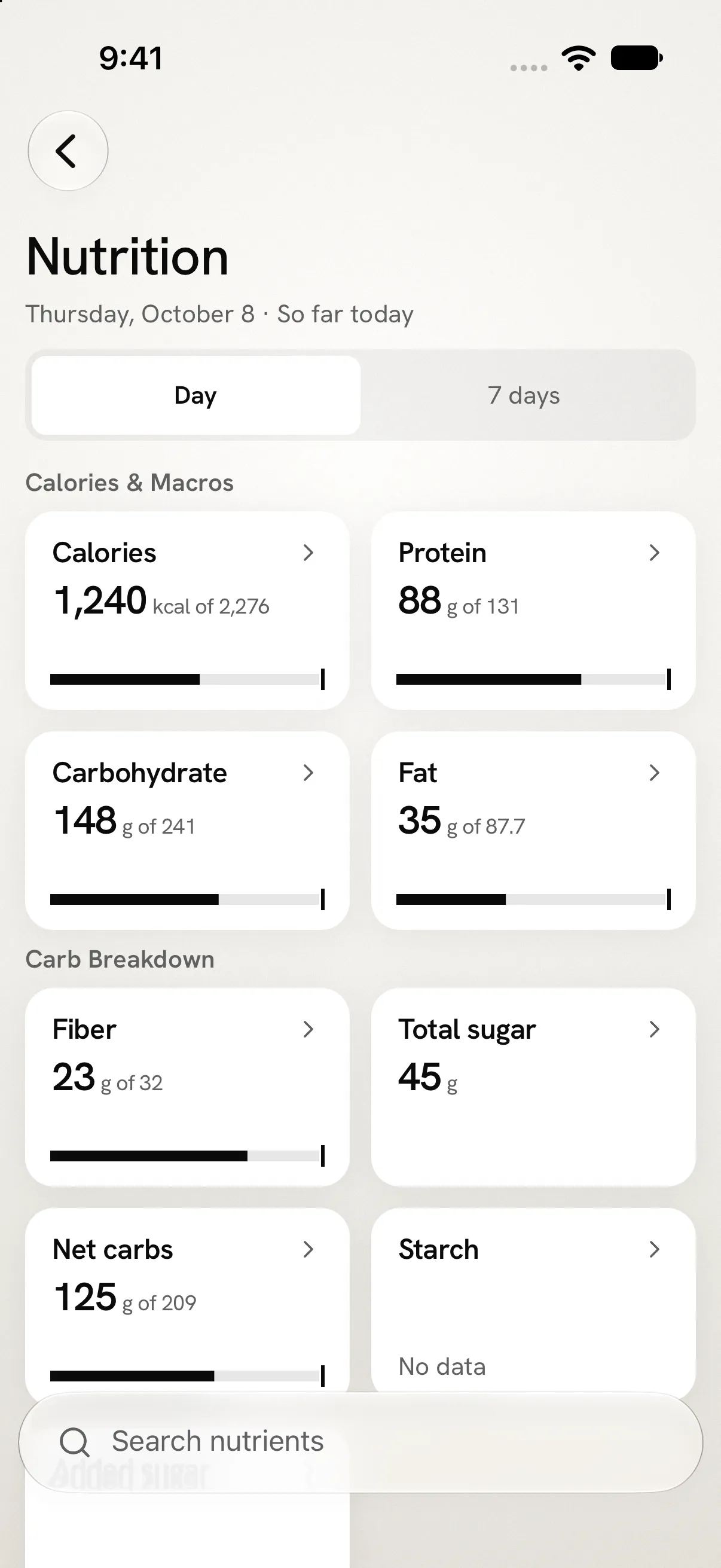
Fit Shapes puts your calories, macros and daily progress in a clear, readable view, with nutrient details a tap away. Typography and spacing make the food log easy to scan.
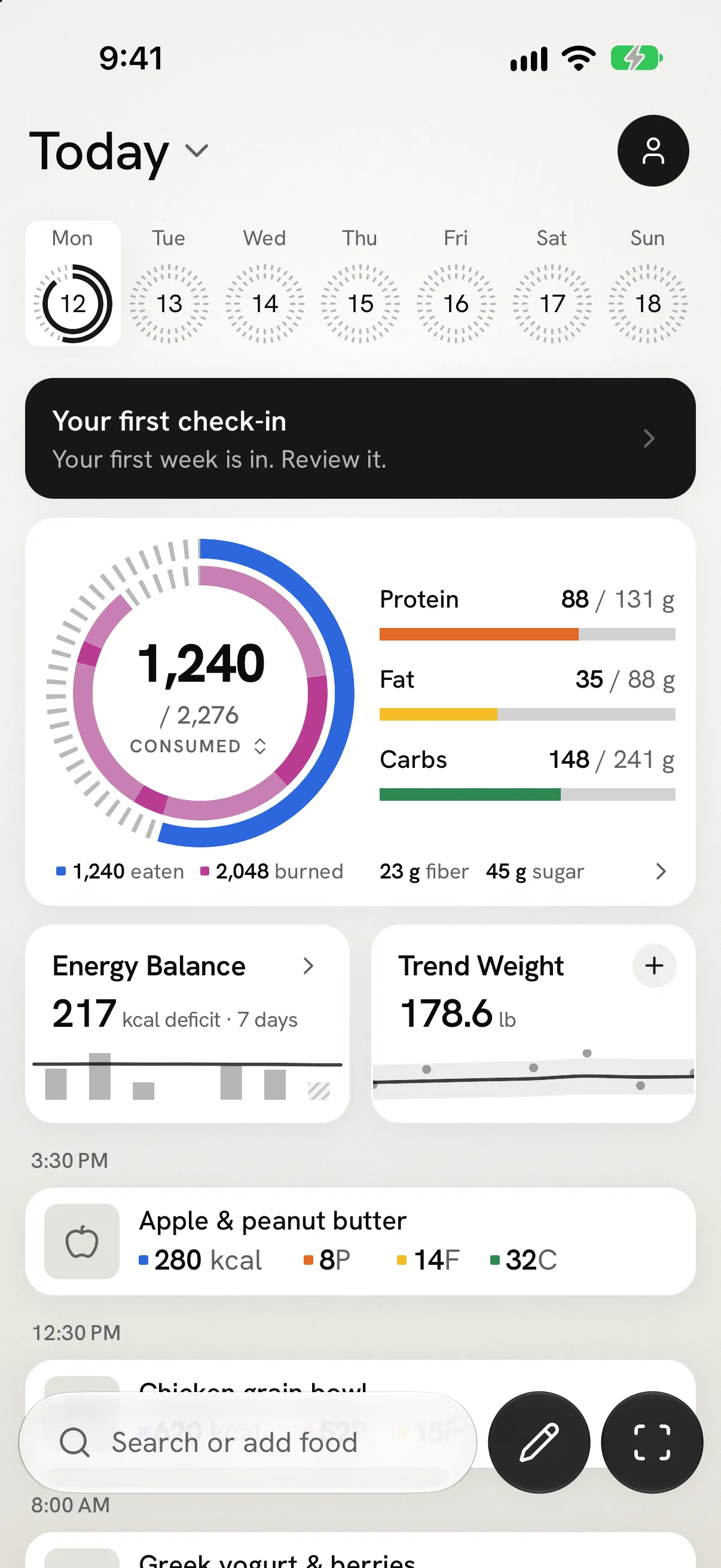
Adaptive Targets proposes changes each week using your food and weight history; you decide whether to accept them.
The good news: Fit Shapes supports importing your MyFitnessPal data. You can bring your meal totals and weigh-ins, though individual foods, recipes and exercise do not transfer. Unfortunately, MyFitnessPal requires a paid Premium or Premium+ plan to export the file.
Fit Shapes believes your data belongs to you. You can export your Fit Shapes data at any time, including after your subscription expires.
Launch price: $4.99 per month or $29.99 per year after a 14-day trial. No ongoing free plan; photo analysis has a daily limit.
Consider it if: you value simple meal logging and beautiful design alongside adaptive targets. Fit Shapes does not currently offer a browser-based tracker.
Platforms: Built for iPhone; Android is in beta with some features still in development. The public iOS App Store listing is not yet available. No browser-based tracker.
Before you move your MyFitnessPal history
- Check the export requirement. MyFitnessPal’s file export is a paid feature. A printable diary report is a different format.
- Choose the dates and keep the ZIP. Download the file from the export email. Keep the original until you have checked the new history.
- Review what will transfer. In Fit Shapes, open Account → Import data → MyFitnessPal, choose the ZIP, and inspect the preview. Check dates, meal entries, weights and skipped days.
- Confirm weight units. Choose pounds or kilograms to match the source and check the latest weight before confirming the import.
The full import guide covers iPhone and Android. Moving your data does not cancel your old subscription; manage billing separately.
When staying with MyFitnessPal makes sense
If your food log, recipes and existing routine work for you, switching has a cost. You will need to learn a new workflow, and some history may not transfer at the same level of detail.
MyFitnessPal also already offers barcode scanning, Meal Scan, export and an ad-free diary in Premium. Compare the plan available to you with the alternative you would actually use. Photo logging alone is not a reason to assume you must switch.
Questions before switching
Which MyFitnessPal alternatives are free?
Cronometer Basic and Lose It! Basic both offer ongoing free plans. Cronometer includes free barcode scanning; Lose It! reserves barcode scanning for Premium. MacroFactor and Fit Shapes require a subscription after their trials.
Which alternative has free barcode scanning?
Cronometer explicitly includes its mobile barcode scanner in the free plan. Its meal-photo feature requires Gold; those are different tools.
Will I lose my MyFitnessPal history?
Keep your original account and export until you have verified the transfer. Fit Shapes imports meal totals and weigh-ins from the ZIP, not a complete copy of individual foods, recipes or exercise records.
Do I need to pay MyFitnessPal to export?
MyFitnessPal requires Premium or Premium+ to export the ZIP that Fit Shapes imports. Check whether your existing access includes it before changing or cancelling your plan.
Which app has the most accurate photo logging?
This comparison does not establish an accuracy winner. It describes available workflows and paid features; review the identified food and portion rather than treating a photo estimate as a measured meal.
How we compared these apps
We compared free-plan limits, paid features and pricing, logging workflows, supported platforms, and history imports using each product’s published documentation. We chose these four apps to cover different reasons for leaving MyFitnessPal, rather than rank every tracker on the market. The Fit Shapes screenshots show its native iPhone interface with sample data; this comparison does not establish a winner for logging speed or photo accuracy.
Prices are in US dollars; local prices and offers can differ. Platform and import documentation was checked on October 14, 2026.
See a simpler way to track with Fit Shapes
A tracker is something you use every day. Fit Shapes brings meal capture, a clear view of your calories and macros, and weekly target proposals into one carefully designed app.
See Fit Shapes in action—from taking a meal photo to seeing it in your log. Keep track of your calories, macros and progress in one clear view.