 MacroFactor
 Cal AI
MacroFactor and Cal AI both ask you to pay from the first week, and both run only on a phone. After that they pull apart. MacroFactor spends its effort on the number at the top of your day, working out what you burn and moving your targets to match. Cal AI spends its effort on the seconds between seeing a meal and having it logged.
One thing worth knowing before you weigh them up. MyFitnessPal bought Cal AI in March 2026, so the faster of these two now searches the incumbent’s food database rather than one of its own.
Targets that adjust, and targets you set
This is the real split. MacroFactor works out what you burn from what you log and how your trend weight moves—“a deterministic calculation based on your calorie intake and change in trend weight”, it says. A weekly check-in on a day you pick updates your calories and macros from that number. You can hand it the whole job or take some of it back, and it publishes accuracy figures for its estimates.
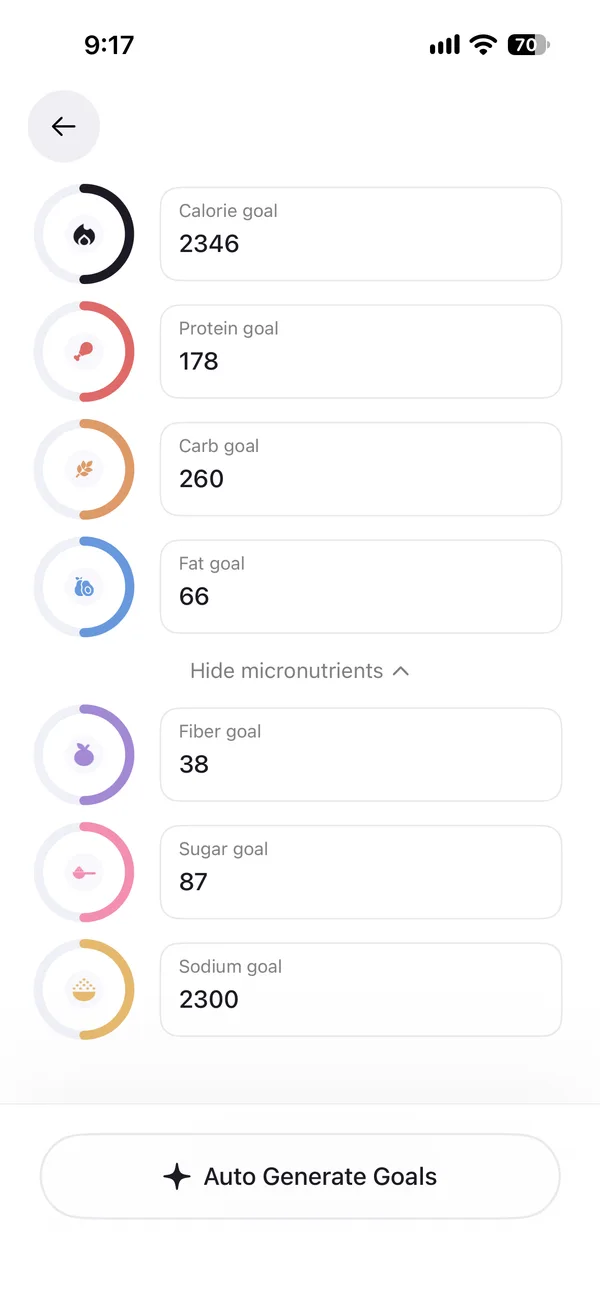
Cal AI asks a short quiz when you start, then writes a target from your answers. You can retake that quiz or type the numbers in yourself, as our Cal AI review shows. Once set, the target stays where it is. Nothing watches your intake and weight and moves it for you, so a stall is yours to notice and yours to fix.
That difference decides most of the choice. If you want the app to own the maths, one of these two does it. If you already know your numbers, paying for an engine you will not use makes little sense.
Logging a meal
Cal AI is built around capture. Photo logging is part of the app and estimates calories and macros straight from the picture. Voice logging and a barcode scanner come with it, and nothing sits behind a second purchase. If your day is a phone held over a plate, that is the shortest path in this pair.
MacroFactor includes photo and barcode logging in its one plan, and no voice logging. Its AI Food Logging fills a plate with editable entries drawn from its own database rather than invented numbers, and you check them before the meal goes in. Describe takes a typed meal, and the phone’s own dictation works there, which is not the same as logging by voice.
The two approaches trade speed against inspection. Cal AI reads the photo and gives you a number. MacroFactor reads the photo and gives you rows from a database you can argue with.
What sits behind the search
MacroFactor’s search holds around 1.36 million verified foods, with roughly 4 million more in its barcode database, and products people submit are checked before they appear.
Cal AI now searches MyFitnessPal’s database, which came with it when MyFitnessPal bought the app in March 2026. That is one of the largest food databases anyone has, and much of it comes from people who entered their own foods, so entries vary in quality and you pick the right one.
Nutrients
MacroFactor tracks 54 items, from macro- and micronutrients to alcohol, caffeine and water, and you can set a floor, a target and a ceiling for any of them.
Cal AI tracks calories, the three macros, fiber, sugar and sodium, each with a goal. That covers what most people watch. If you follow a vitamin or a mineral, it is not in this app.
Price
MacroFactor has no free plan. Its product page answers the question directly—“No, there isn’t (and will never be) a free version”. After a 7-day trial it costs $71.99 a year, $47.99 for six months, or $11.99 a month, as of October 2026, with every feature in that one plan.
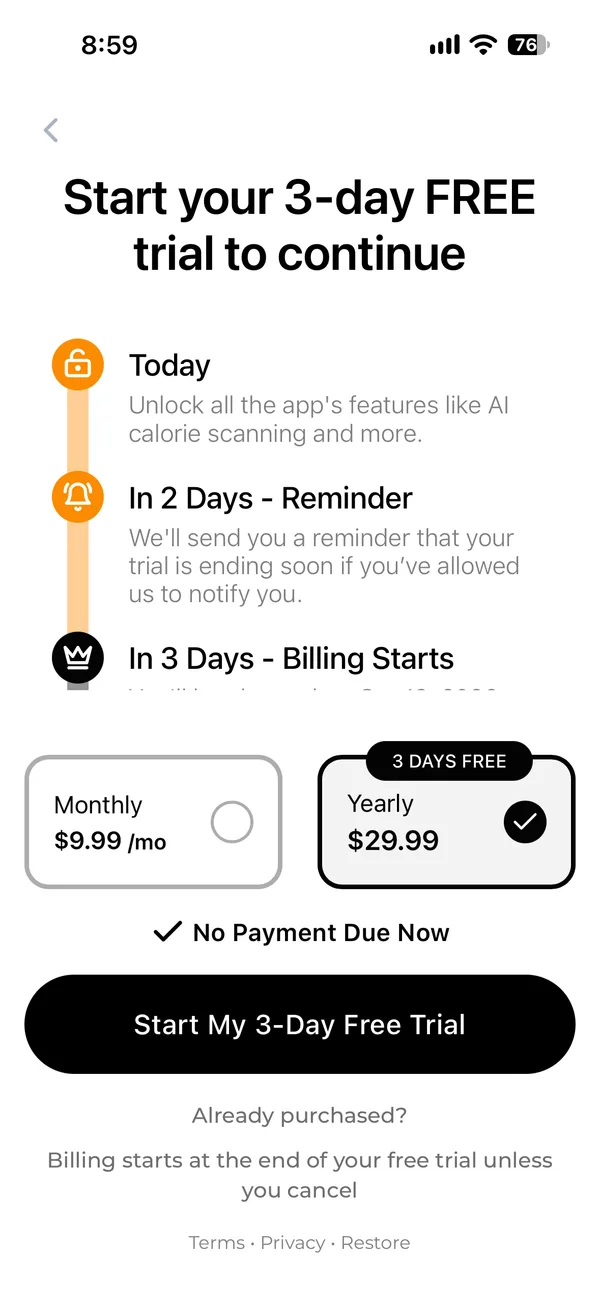
Cal AI has no free plan either, and a 3-day trial. It does not publish its prices and it tests them often, so your price may differ from the one someone else sees. The comparison above shows the ranges the App Store and Google Play list, which is the closest thing to a rate card this app offers.
On the year, Cal AI costs well under half what MacroFactor does. You are paying less for an app that asks more of you.
Taking your data out, and bringing it in
Neither app imports a food log from another tracker. MacroFactor brings in daily calorie and macro totals through Apple Health or Health Connect rather than the foods, and Cal AI’s FAQ says an import is not available yet. Either way you start your log again.
Getting data out differs more than it looks. MacroFactor exports spreadsheets of your food log and progress. Cal AI produces a PDF summary report. A PDF is something to read, not something to move, so if you expect to leave one day, that is worth knowing before you build a year of history.
Where they run
MacroFactor runs on iPhone, iPad, Android and Apple Watch, with no web app. It also ignores calorie burn from a watch when setting targets, since it reads what you burn from your intake and weight instead.
Cal AI runs on iPhone, Apple Watch and Android. Neither app lets you log from a computer.
Where Fit Shapes fits
These two sit at opposite ends. MacroFactor gives you the engine and asks you to check every entry. Cal AI gives you the speed and leaves the target alone.
Fit Shapes takes both halves. Adaptive Targets proposes a new set of calories and macros each week from what you eat and weigh, the way MacroFactor’s check-in does. A photo logs the meal at once, and every subscription includes photo, voice and barcode logging, the way Cal AI’s capture does. It costs $29.99 a year, the same as the Cal AI offer we saw and well under MacroFactor’s, after a 14-day trial. It imports your data, which neither of these does, and you can export it any time, including after a subscription ends.
The catch is Android. Fit Shapes runs on iPhone, and Android is still in beta, while both of these ship on Android today. MacroFactor also has iPad and Apple Watch apps, and publishes accuracy figures for its expenditure estimates, which we do not. And like both of them, Fit Shapes has no free plan.
Questions
Is MacroFactor better than Cal AI?
Neither is better for everyone. MacroFactor suits you if you want targets that adjust each week and a verified database behind the search. Cal AI suits you if you want the fastest way to get a meal logged and you are happy setting your own target.
Is Cal AI cheaper than MacroFactor?
Yes, by a wide margin on the year. MacroFactor costs $71.99 a year or $11.99 a month. Cal AI does not publish prices and changes them often, so the comparison above shows the ranges its App Store and Google Play listings give.
Does Cal AI adjust your calories like MacroFactor?
No. Cal AI writes a target from a starting quiz and leaves it there until you change it. MacroFactor works out what you burn from your intake and weight trend and updates your targets at a weekly check-in.
Which has the better food database?
They are large in different ways. MacroFactor holds around 1.36 million verified foods and checks what people submit. Cal AI searches MyFitnessPal’s database, which came with the acquisition and is bigger but more mixed, since its own users entered much of it.
Do they search the same food database?
No, and the difference is recent. MacroFactor searches its own verified database. Cal AI searches MyFitnessPal’s, which came with it when MyFitnessPal bought the app in March 2026. So comparing these two on food data is really comparing a curated database against the largest crowd-sourced one.
Can I log by voice in MacroFactor?
No. MacroFactor has no voice logging. Its Describe feature takes typed text, and your phone’s own dictation works there. Cal AI includes voice logging.
Can I use MacroFactor or Cal AI on a computer?
Neither. MacroFactor runs on iPhone, iPad, Android and Apple Watch. Cal AI runs on iPhone, Apple Watch and Android. Both are phone apps.
Can I move my food log from one to the other?
No. Neither app imports a diary from another tracker. MacroFactor brings in daily calorie and macro totals from Apple Health or Health Connect, not the foods, and Cal AI has no import yet.
How do I get my data out of Cal AI?
Cal AI produces a PDF summary report. That reads well and moves badly, so plan for it if you think you might switch later. MacroFactor exports spreadsheets of your food log and progress.
Sources
17 sources
- MacroFactor, apps.apple.com/us/app/macrofactor-macro-tracker/id1553503471, checked October 15, 2026
- MacroFactor, macrofactor.com/macrofactor/, checked October 15, 2026
- MacroFactor, help.macrofactorapp.com/en/articles/258-ai-food-logging, checked October 15, 2026
- MacroFactor, help.macrofactorapp.com/en/articles/216-log-foods-with-describe, checked October 18, 2026
- MacroFactor, help.macrofactorapp.com/en/articles/247-introduction-to-check-ins-and-coaching-modules, checked October 15, 2026
- MacroFactor, help.macrofactorapp.com/en/articles/36-where-is-my-nutrition-synced, checked October 15, 2026
- MacroFactor, help.macrofactorapp.com/en/articles/68-export-your-data, checked October 15, 2026
- MacroFactor, help.macrofactorapp.com/en/articles/46-food-search-database, checked October 15, 2026
- MacroFactor, macrofactor.com/macrofactor-vs-myfitnesspal-2025/, checked October 15, 2026
- Cal AI, calai.app/faq, checked October 16, 2026
- Cal AI, calai.app/, checked October 16, 2026
- Cal AI, apps.apple.com/us/app/cal-ai-calorie-tracker/id6480417616, checked October 16, 2026
- Cal AI, play.google.com/store/apps/details?id=com.viraldevelopment.calai, checked October 16, 2026
- Cal AI, fitshapes.com/compare/cal-ai-review/paywall.webp, checked October 16, 2026
- Cal AI, fitshapes.com/compare/cal-ai-review/voice.webp, checked October 16, 2026
- Cal AI, fitshapes.com/compare/cal-ai-review/edit-goals.webp, checked October 16, 2026
- Cal AI, techcrunch.com/2026/03/02/myfitnesspal-has-acquired-cal-ai-the-viral-calorie-app-built-by-teens/, checked October 16, 2026